DJ Library · Live Interaction
The missing layer between your set and your audience. Guests browse your library, suggest tracks, and vote — while you stay fully focused on the music.
Get in touchCrowdfader runs entirely on your DJ laptop — no third parties, no monthly costs, no internet required. Your library and guest data never leave your machine.
Instead of a proprietary API, Crowdfader reads and writes the Serato database files directly. Changes — new crates, accepted suggestions, uploaded tracks — are live in under 2 seconds. No restart, no export.
Guests open the web app via QR code directly in their browser — on iOS and Android. No installation, no account, no permission from Apple or Google required. Anyone who wants can save it as a PWA on their home screen.
Setup
No cloud subscription, no installation on guest devices, no third parties. Crowdfader runs locally on your DJ laptop.
Launch the server on your DJ laptop, the browser opens automatically. The Serato library is loaded directly from the database — no restart, no configuration.
Display a QR code in the DJ panel or show the link on the projector. Guests open the web app instantly — no installation, no account.
Suggestions come in in real time, votes accumulate, harmonic recommendations appear. You stay in control — you decide what gets played.
Features
From library management to live audience interaction — in one app that works directly with Serato.
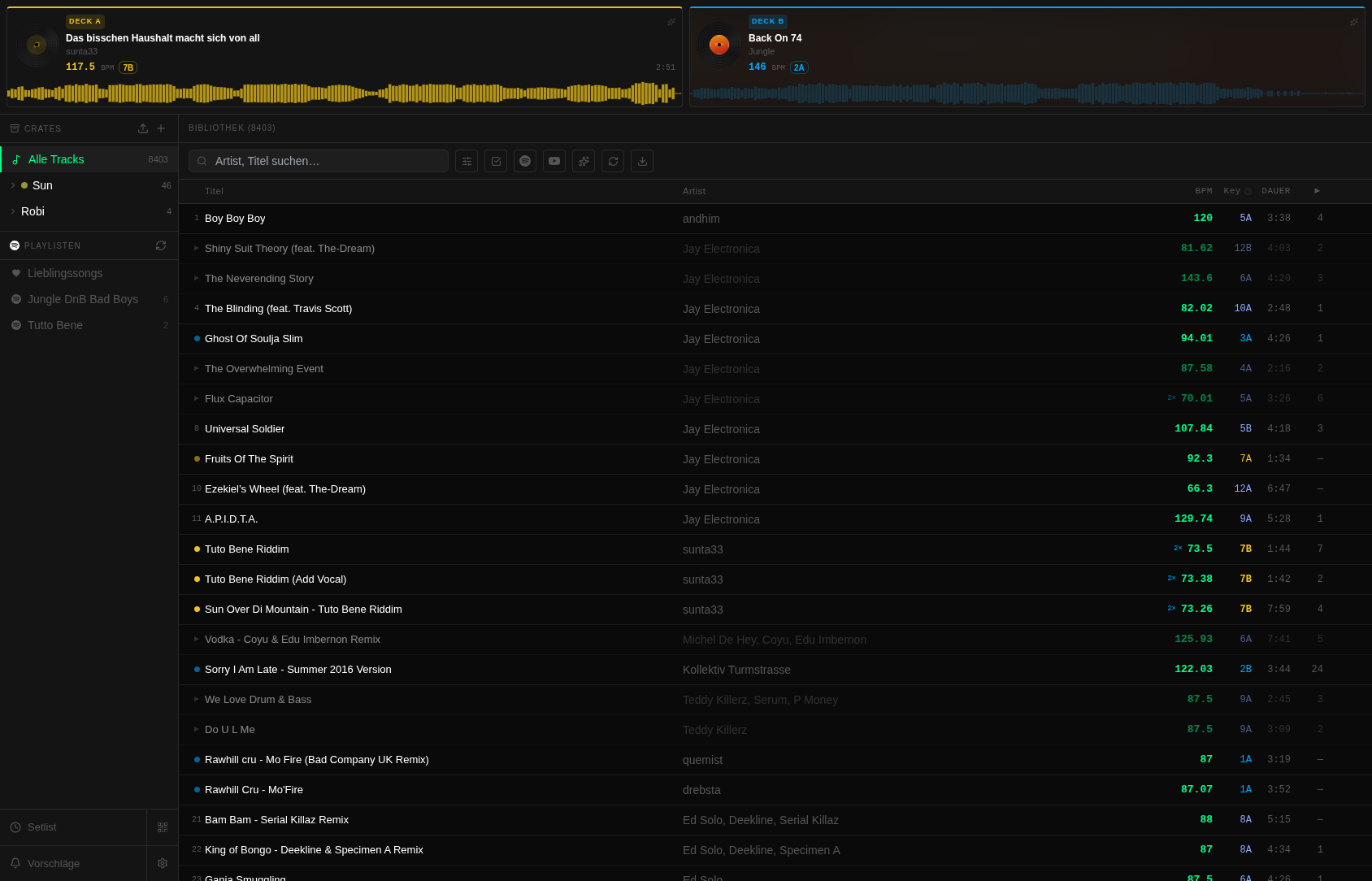
All 4 decks at a glance: BPM, Camelot key, cover art, waveform and duration — live from Serato. Deck colors run through the entire library so matching tracks are instantly recognizable. Click a deck to open the full track detail dialog.
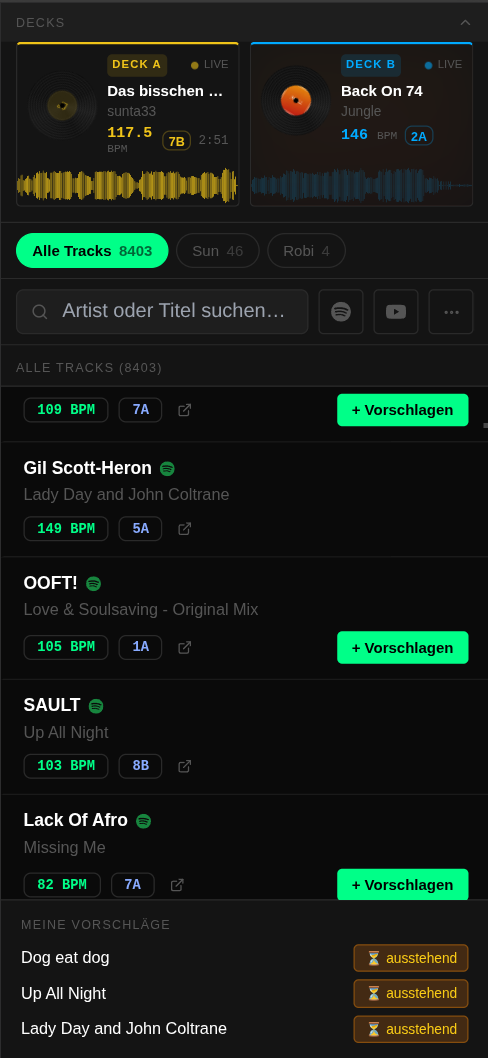
Guests open the web app via QR code on their phone — no installation, no account. They browse the complete library, suggest tracks, and vote for others' suggestions. You see all suggestions sorted by votes and decide with a click.
The Camelot Wheel live in the library: tracks that harmonically match one or more decks are color-highlighted — exact matches more strongly than compatible neighbors. Works for all 4 decks simultaneously, with BPM half- and double-time hints.
Add Spotify tracks directly to Serato crates. Import personal playlists and Liked Songs. Guests can also suggest Spotify tracks — BPM and key are analyzed by Serato. OAuth login for playlists, search also works without an account.
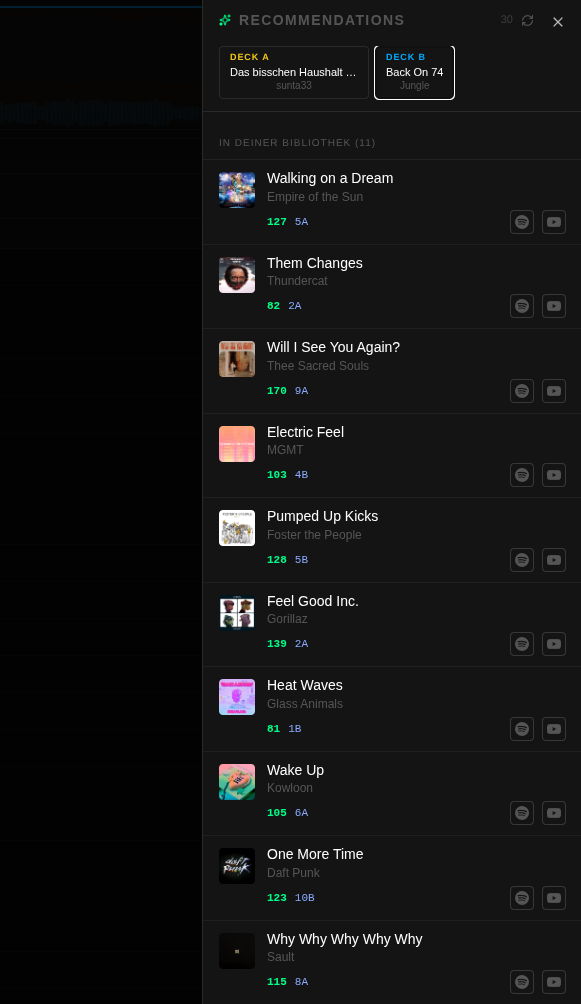
Similar tracks to the currently playing song — filtered and sorted by local library match. Search directly on Spotify from the panel, submit as a guest suggestion, or drop into a crate. Works for all active decks simultaneously.
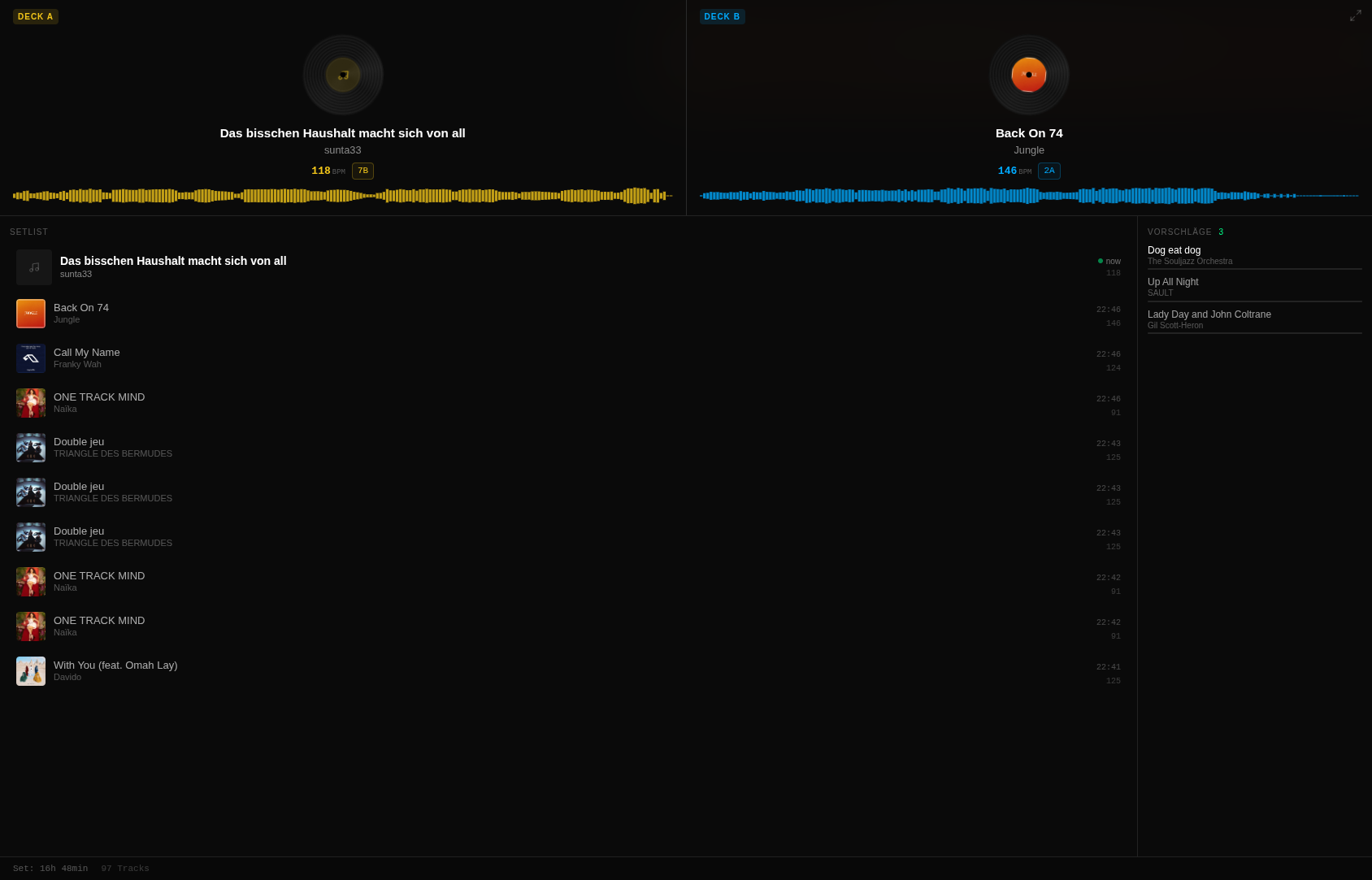
A dedicated view for stage screens and projectors without controls: active decks with large cover art, BPM, key and deck color. Below it, a running setlist with thumbnails and timestamps. No login, no refresh needed.
Serato OVB waveform data is read directly and displayed as a colored waveform. Where no Serato data is available, Crowdfader automatically analyzes BPM and key via Essentia — silently in the background, without a Serato restart.
Complete session history with timestamps and play counts. Visible as a setlist on the projector in display mode, accessible for guests in the web app. Per-track statistics show how often and when a song was played.
Load new tracks directly from the browser into the Serato library — via drag & drop or file dialog. Crate assignment right at upload. BPM and key analysis start automatically in the background as soon as the file lands.
Rule-based virtual crates that dynamically fill from the library: filters by BPM range, Camelot key, genre or free text — combinable. No crate file, no manual maintenance. Ideal for genre sets or tempo blocks.
Reads and writes the Serato database files directly, without going through an external API. Crates, tracks and metadata are visible in under 2 seconds — no Serato restart, no file export.
Installable as a Progressive Web App on iOS and Android — behaves like a native app, without the App Store. The guest view is fully touch-optimized: large tap targets, swipe navigation, compact deck cards.
WebSocket push for all connected devices simultaneously. New suggestion, fresh vote, library change — everyone sees it instantly without a reload. Works over local WiFi and via ngrok tunnel for external guests.
Optional PIN protection for the DJ view. Activates automatically when Crowdfader is reachable via a public tunnel. The guest view always remains open — DJ functions stay protected.
Interface
01 / 06
The central workspace: 4-deck bar with BPM, key and waveform, hierarchical crate panel, search bar with BPM and key filters. Harmonically matching tracks are highlighted in deck color — for all active decks simultaneously.
02 / 06
Dedicated view for stage screens and projectors. Shows the running decks with cover art, title, BPM and key — along with a running setlist with thumbnails and timestamps. No interaction, no login.
03 / 06
Touch-optimized view for guests on mobile. Accessible via QR code, no installation needed. Guests see the decks, browse the library, suggest tracks and vote for other suggestions.
04 / 06
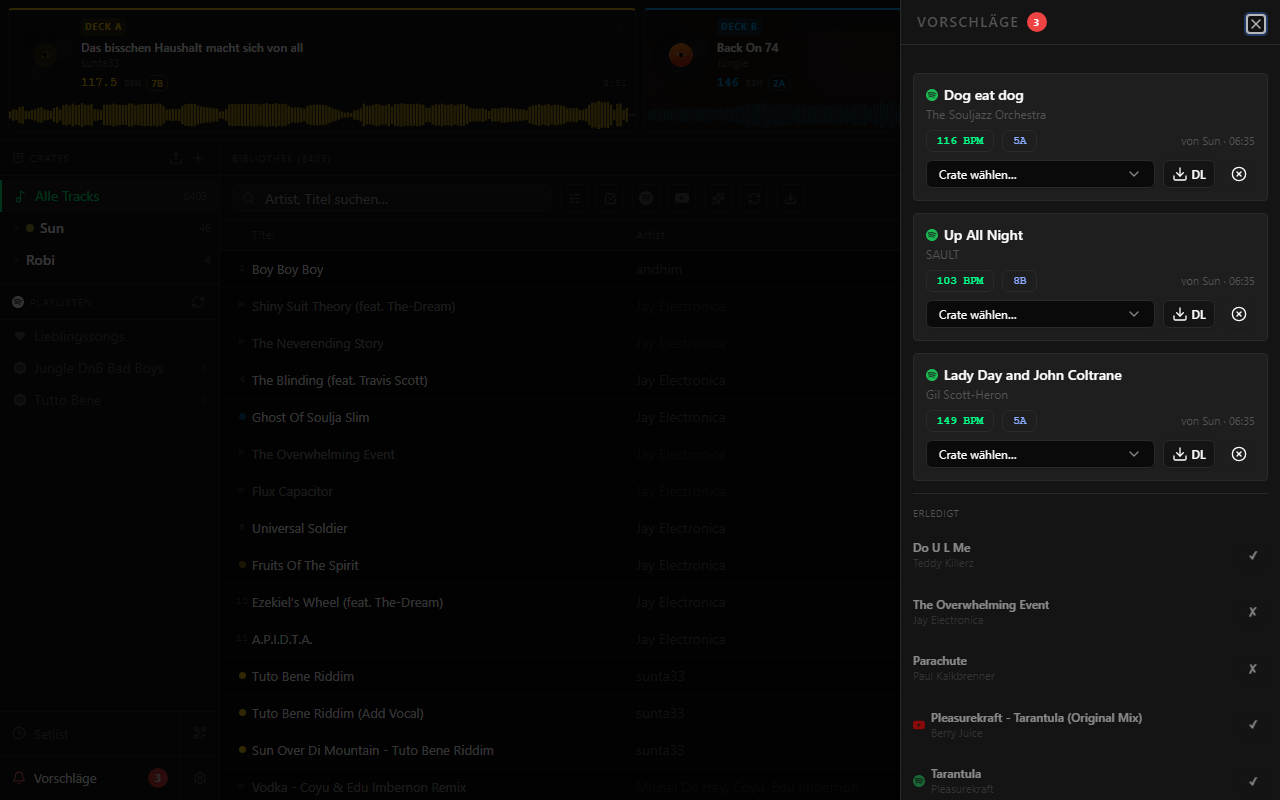
All guest suggestions at a glance, sorted by votes. Accept tracks directly (optionally add to a crate) or reject them. Completed suggestions remain visible as an archive.
05 / 06
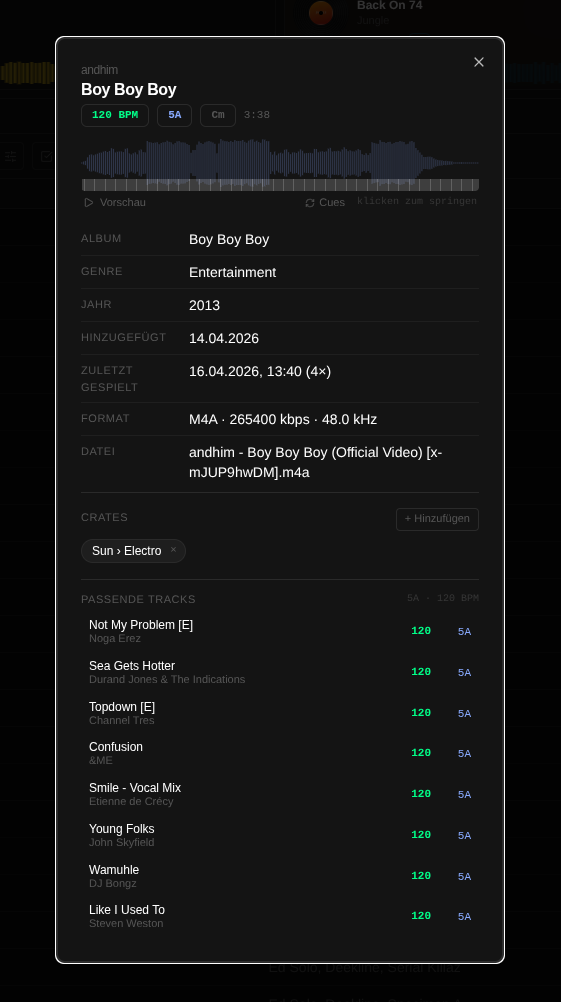
Complete metadata, waveform visualization and "Matching Tracks" — tracks from the entire library that match harmonically (Camelot ±1) and fall within BPM range (±10%). Opens with a click on any track or deck card.
06 / 06
Similar tracks to the currently playing song via Last.fm, filtered and highlighted by local library match. Search directly on Spotify from the panel or suggest to the DJ.
Use cases
Everywhere music and audience meet — and where a DJ needs to keep an overview.
Regular guests know you and want to have a say — but shoulder-tapping and written requests interrupt the set. With Crowdfader, suggestions come in in an organized way, votes show what's really wanted, and you decide when and whether to play it.
Wedding, birthday, corporate event: guests have requests. The suggestion feature takes the pressure off you — everything runs in a structured way, you review them live, and the setlist is automatically documented at the end.
Multiple screens, thousands of viewers: Display Mode runs on stage screens and projectors — cover art, active decks, running setlist with timestamps. No login, no refresh, no extra hardware needed.
As a permanent installation in a venue: guests see what's playing, suggest tracks, vote — the DJ stays focused, the audience feels heard. The display view runs continuously without any maintenance.
FAQ
Serato DJ Pro from version 4.0.4 on Windows 10 and Windows 11. macOS support is planned — feel free to get in touch if you have specific needs.
No — Crowdfader runs entirely locally on the DJ laptop. Guests connect via your WiFi. Optionally, a Cloudflare / ngrok tunnel can be activated so external guests or viewers can participate from outside.
There's no hard limit — it depends on your WiFi. In practice, it works fine with 30–60+ simultaneously connected devices on a normal consumer router.
No. The guest view runs directly in the browser — no download, no account. Anyone who wants can save it as a Progressive Web App (PWA) on their home screen for an app-like experience.
Yes. The DJ view can be secured with a PIN code. Protection activates automatically when Crowdfader is reachable from outside via a public tunnel — so nobody can access the DJ view unnoticed.
Your own API credentials are needed for Spotify search — registration is free at developer.spotify.com. For access to personal playlists and Liked Songs, an additional OAuth login is required. Search also works without OAuth.
Nothing leaves your laptop. Crowdfader reads and writes the local Serato database files directly. No cloud sync, no telemetry, no external servers — unless you consciously activate optional services like Spotify or Last.fm.
Interested?
Inquiries, demos and individual setups — just send an email.
sun@crowdfader.club